
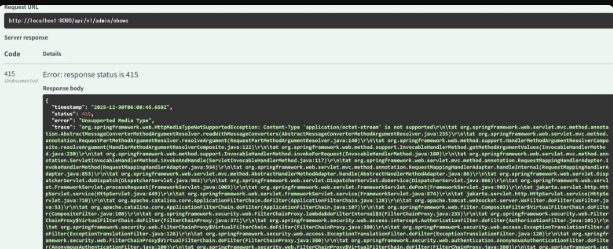
{
    "timestamp": "2025-12-30T06:00:45.658Z",
    "status": 415,
    "error": "Unsupported Media Type",
    "trace": "org.springframework.web.HttpMediaTypeNotSupportedException: Content-Type 'application/octet-stream' is not supported\r\n\tat org.springframework.web.servlet.mvc.method.annotation.AbstractMessageConverterMethodArgumentResolver.readWithMessageConverters(AbstractMessageConverterMethodArgumentResolver.java:235)\r\n\tat org.springframework.web.servlet.mvc.method.annotation.RequestPartMethodArgumentResolver.resolveArgument(RequestPartMethodArgumentResolver.java:140)\r\n\tat org.springframework.web.method.support.HandlerMethodArgumentResolverComposite.resolveArgument(HandlerMethodArgumentResolverComposite.java:122)\r\n\tat org.springframework.web.method.support.InvocableHandlerMethod.getMethodArgumentValues(InvocableHandlerMethod.java:230)\r\n\tat org.springframework.web.method.support.InvocableHandlerMethod.invokeForRequest(InvocableHandlerMethod.java:180)\r\n\tat org.springframework.web.servlet.mvc.method.annotation.ServletInvocableHandlerMethod.invokeAndHandle(ServletInvocableHandlerMethod.java:117)..."
}
문제 상황
토이 프로젝트 개발 중 관리자 공연 등록 API를 개발하던 중, Swagger UI를 통한 테스트에서 415 Unsupported Media Type 에러가 발생했다.
API는 공연 정보(JSON)와 포스터 이미지, 상세 이미지들을 multipart/form-data 형식으로 함께 받아야 하는 구조였다. 그런데 요청을 보낼 때마다 다음과 같은 에러가 반복적으로 발생했다. 특히 이상한 점은, 분명 Swagger UI에서 JSON 데이터를 application/json으로 전송했는데, Spring 서버에서는 이를 application/octet-stream(바이너리 데이터)으로 인식한다는 것..!
초기코드
@PostMapping(consumes = MediaType.MULTIPART_FORM_DATA_VALUE)
public ResponseEntity<ApiResponse<ShowCreateResponse>> createShow(
        @RequestBody @Valid ShowCreateRequest request,  // 문제의 원인
        @RequestPart("poster") MultipartFile poster,
        @RequestPart(value = "detailImages", required = false) List<MultipartFile> detailImages) {
    // ...
}
```

### 에러 로그
```
Content-Type 'application/octet-stream' is not supported
415 Unsupported Media Type
문제 원인 분석
1. @RequestBody의 동작 방식 문제 상황
@RequestBody는 HTTP 요청 본문 전체를 하나의 객체로 역직렬화
- 일반적으로 application/json Content-Type과 함께 사용
- 전체 request body를 JSON으로 파싱하려고 시도
- Multipart 요청과는 근본적으로 맞지 않는 구조
2. Multipart 요청의 구조
파트가 독립적인 Content-Type을 가지고 있습니다.
POST /api/admin/shows HTTP/1.1
Content-Type: multipart/form-data; boundary=----WebKitFormBoundary

------WebKitFormBoundary
Content-Disposition: form-data; name="data"
Content-Type: application/json

{"title": "오페라의 유령", "genre": "MUSICAL"}
------WebKitFormBoundary
Content-Disposition: form-data; name="poster"; filename="poster.jpg"
Content-Type: image/jpeg

[바이너리 데이터]
------WebKitFormBoundary--
3. 왜 application/octet-stream으로 인식되었나?
Swagger UI에서 JSON 파트를 전송할 때:
- Swagger는 data 파트를 application/json으로 명시
- 하지만 Spring의 @RequestBody는 multipart의 개별 파트를 처리할 수 없음
- Spring이 해당 파트를 바이너리 데이터(octet-stream)로 오해석
- Jackson이 octet-stream을 JSON으로 파싱 시도 → 실패
해결 과정
시도 1: ObjectMapper를 이용한 수동 파싱
@PostMapping(consumes = MediaType.MULTIPART_FORM_DATA_VALUE)
public ResponseEntity<ApiResponse<ShowCreateResponse>> createShow(
        @RequestPart("data") String dataJson,  // String으로 받기
        @RequestPart("poster") MultipartFile poster,
        @RequestPart(value = "detailImages", required = false) List<MultipartFile> detailImages)
        throws JsonProcessingException {

    ObjectMapper objectMapper = new ObjectMapper();
    ShowCreateRequest request = objectMapper.readValue(dataJson, ShowCreateRequest.class);

    // Validation 수동 처리 필요
    // ...
}
문제점:
- @Valid 자동 검증 불가
- 수동으로 Validator 호출 필요
- 코드 복잡도 증가
- 에러 처리 로직 추가 필요
시도 2: HttpMessageConverter 커스터마이징
@Configuration
public class WebConfig implements WebMvcConfigurer {
    @Override
    public void configureMessageConverters(List<HttpMessageConverter<?>> converters) {
        MappingJackson2HttpMessageConverter converter = new MappingJackson2HttpMessageConverter();
        converter.setSupportedMediaTypes(Arrays.asList(
            MediaType.APPLICATION_JSON,
            MediaType.APPLICATION_OCTET_STREAM  // 추가
        ));
        converters.add(converter);
    }
}
문제점:
- 전역 설정 변경으로 다른 API에 영향 가능
- 근본적인 해결책이 아님
- octet-stream을 JSON으로 파싱하는 것은 의미론적으로 부적절
최종 해결책: @RequestPart 사용
@Operation(
    summary = "공연 등록",
    description = "새로운 공연을 등록합니다.\n\n" +
                 "**요청 형식:** multipart/form-data\n\n" +
                 "**필수 필드:**\n" +
                 "- `data`: 공연 정보 (JSON)\n" +
                 "- `poster`: 포스터 이미지 파일\n\n" +
                 "**선택 필드:**\n" +
                 "- `detailImages`: 상세 이미지 파일 목록 (여러 개 가능)\n\n" +
                 "**장르 (genre):** MUSICAL, CONCERT, THEATER, CLASSIC, DANCE"
)
@PostMapping(consumes = MediaType.MULTIPART_FORM_DATA_VALUE)
public ResponseEntity<ApiResponse<ShowCreateResponse>> createShow(
        @Parameter(
            description = "공연 정보 (JSON)",
            required = true,
            schema = @Schema(implementation = ShowCreateRequest.class)
        )
        @RequestPart(value = "data", required = true) @Valid ShowCreateRequest request,

        @Parameter(
            description = "포스터 이미지 파일 (jpg, jpeg, png, gif, webp, 최대 10MB)",
            required = true
        )
        @RequestPart("poster") MultipartFile poster,

        @Parameter(description = "상세 이미지 파일 목록 (선택, 여러 개 가능)")
        @RequestPart(value = "detailImages", required = false) List<MultipartFile> detailImages) {

    ShowCreateResponse result = adminShowService.createShow(request, poster, detailImages);
    return ResponseEntity.status(HttpStatus.CREATED)
        .body(ApiResponse.success(result, result.getMessage()));
}
핵심 포인트
- @RequestPart 사용
- Multipart 요청의 각 파트를 개별적으로 처리
- 각 파트의 Content-Type에 맞게 자동 변환
- JSON 파트는 자동으로 Jackson이 역직렬화
- @Valid 검증 지원
- Spring의 표준 Validation 기능 사용 가능
- 별도의 Validator 호출 불필요
- Swagger 문서화
- @Schema(implementation = ...) 로 명확한 스키마 정의
- Swagger UI에서 정확한 예시 표시
배운 점
- @RequestBody는 전체 request body를 처리하므로 Multipart와 구조적으로 불일치
- @RequestPart는 각 파트의 Content-Type을 존중하며 적절히 변환
- Spring은 올바른 어노테이션 사용 시 복잡한 설정 없이도 잘 동작
'Backend Engineering > Java & Spring' 카테고리의 다른 글
| 배포 후 마주한 CORS와 쿠키 이슈, Spring Security로 해결 (0) | 2026.01.15 |
|---|---|
| HttpServletRequest, 구식 기술일까? - 현업에서 만난 진실 (0) | 2026.01.06 |
| Spring Boot JAR 배포 시 application.yml 설정 적용 우선순위 (0) | 2025.02.19 |
| 파일 다운로드: POST 방식과 location.href의 차이점과 구현 방법 (0) | 2025.01.25 |
| 세션(Session)과 쿠키(Cookie)의 차이점과 사용 사례 (0) | 2025.01.16 |